Compare Datalexing and Airtable for team and task management to find the ideal tool for your business. Datalexing is a Saudi AI-powered productivity platform that combines smart tables, dynamic forms, Kanban boards, and live reports in one unified system with full Arabic support. Airtable offers a flexible database with a familiar spreadsheet interface. Learn about the differences in automation, customization, security, and pricing to choose the best solution for managing your team's data and projects.
Modern businesses—whether large in-person offices, fully remote setups, or a hybrid mix—are powered by the cloud. A wide range of software is used to manage operations, but none are more prevalent than productivity tools that blend task management, note-taking, and team collaboration.
From building internal knowledge bases and policy documents to tracking project progress and managing team tasks, every team—HR, marketing, product, sales, and more—relies on productivity tools daily, and some depend on them all day long.
That’s why selecting a tool that is user-friendly, flexible, and adaptable to various use cases across all teams is crucial. If enhancing collaboration, centralizing data, and maximizing productivity are top priorities, a cloud-based productivity platform becomes indispensable.
And if it offers advanced features like automation, integrated dashboards, and secure hosting, that’s the cherry on top.
In this article, we’ll compare two leading contenders in the team and task management space, Datalexing and Airtable, to help you decide which tool suits your business best in 2025.
What is Datalexing?
Datalexing is a user-friendly and versatile tool designed to cater to a wide range of users, from individuals to teams across various industries. It simplifies project management, task organization, and workspace coordination with its intuitive interfaces and easy-to-use features.
This all-in-one tool makes it effortless to track tasks, set goals, manage data, and automate workflows. Whether you’re a beginner or an experienced professional, Datalexing’s simple yet powerful design ensures that everyone can get the most out of it.
With features like Kanban boards, real-time collaboration, advanced dashboards, and interlinked tables, Datalexing provides everything you need to stay organized and productive. It’s fully customizable and supports the Arabic language, with localized hosting to meet regional requirements, making it a perfect fit for users in Saudi Arabia and beyond.
Datalexing bridges simplicity and functionality, offering a tool that anyone can use to streamline their projects, enhance collaboration, and achieve their goals with ease.
Datalexing Features
Let’s look at some of Datalexing best project management features and how they help you manage your goals, tasks, and resources well.
Localization
Let’s look at some of Datalexing best project management features and how they help you manage your goals, tasks, and resources well.
One of Datalexing’s standout localization features is its local data hosting within Saudi Arabia. This approach complies with local cybersecurity requirements, such as those set by the National Cybersecurity Authority, ensuring the highest levels of data security and sovereignty. In addition, Datalexing supports the translation of English texts into Arabic using artificial intelligence. This feature simplifies communication and collaboration for teams operating in multilingual environments, ensuring inclusivity and efficiency.
Datalexing’s localization capabilities make it a leading example of how productivity tools can be adapted to serve specific regional needs effectively, offering unmatched flexibility and compliance for businesses in the Middle East.
Permission
An advanced permission management system that allows users to define who can view or edit data, ensuring information security and confidentiality. Permissions are defined across multiple levels (workspace – application – tables – dashboard – pages). For workspaces, applications, and tables, permissions are categorized into the following levels:
Admin
Description:
Has full system permissions, including the ability to manage users, modify general settings, customize permissions, and create templates, tables, and everything that builders can do.Key Functions:
Full control over system settings.
Manage user roles and permissions.
Monitor the system and ensure compliance with security standards.
Create and customize tables and dashboards.
Builder
Description:
Has permission to modify table structures and permissions (workspace – application – table levels). Builders can create and edit applications fully. They can create and manage applications, modify field names and types in tables, and perform all actions available to editors.
Editor
Description:
Editors can create and edit data in tables and manage tasks. They have extensive permissions but no full control over system settings and cannot create applications or workspaces. They can perform all actions available to commenters.Key Functions:
Add, modify, and delete data.
Manage tasks within projects.
Interact with and update dashboards.
Commenter
Description: Can only read and comment on data. Has the ability to perform all actions available to viewers.
Viewer
Description: Limited to viewing data without any editing capabilities. Ideal for employees or partners who need to access information without making changes.
Key Functions:
View tables, projects, and dashboards.
Filter and search data within tables.
No Access
Cannot access any content.
Dashboards
In a world increasingly reliant on data for decision-making, Datalexing dashboards are an essential tool for any organization looking to analyze its data and transform it into actionable insights. Whether you manage a small team or a large organization, these dashboards provide a flexible and integrated platform that combines ease of use with advanced functionality.
Datalexing dashboards enable you to transform numbers and data into visual representations, such as pie charts and bar graphs, making it easier to understand trends and track performance. With the ability to integrate data from different departments, you can gain a comprehensive view of your organization’s performance, allowing for efficient workflow monitoring.
One of the standout features of Datalexing dashboards is their ease of access and organization. Users can view all dashboards through a single, intuitive interface. Additionally, multiple pages can be created within the same dashboard and organized to meet various business needs. Users can also include links to related tables or add text alongside visualizations, making the experience more comprehensive and clearer.
Moreover, these dashboards empower managers with the ability to define access permissions, allowing them to view dashboards from other departments and consolidate all charts into a single page. This provides a complete view of the organization's performance and enables tracking of workflows across departments. These features make dashboards a powerful tool that simplifies team collaboration and enhances strategic decision-making based on accurate and up-to-date data.
Enjoy the experience of flexible and user-friendly dashboards that support your organization’s growth and provide the comprehensive insights needed to achieve your goals.
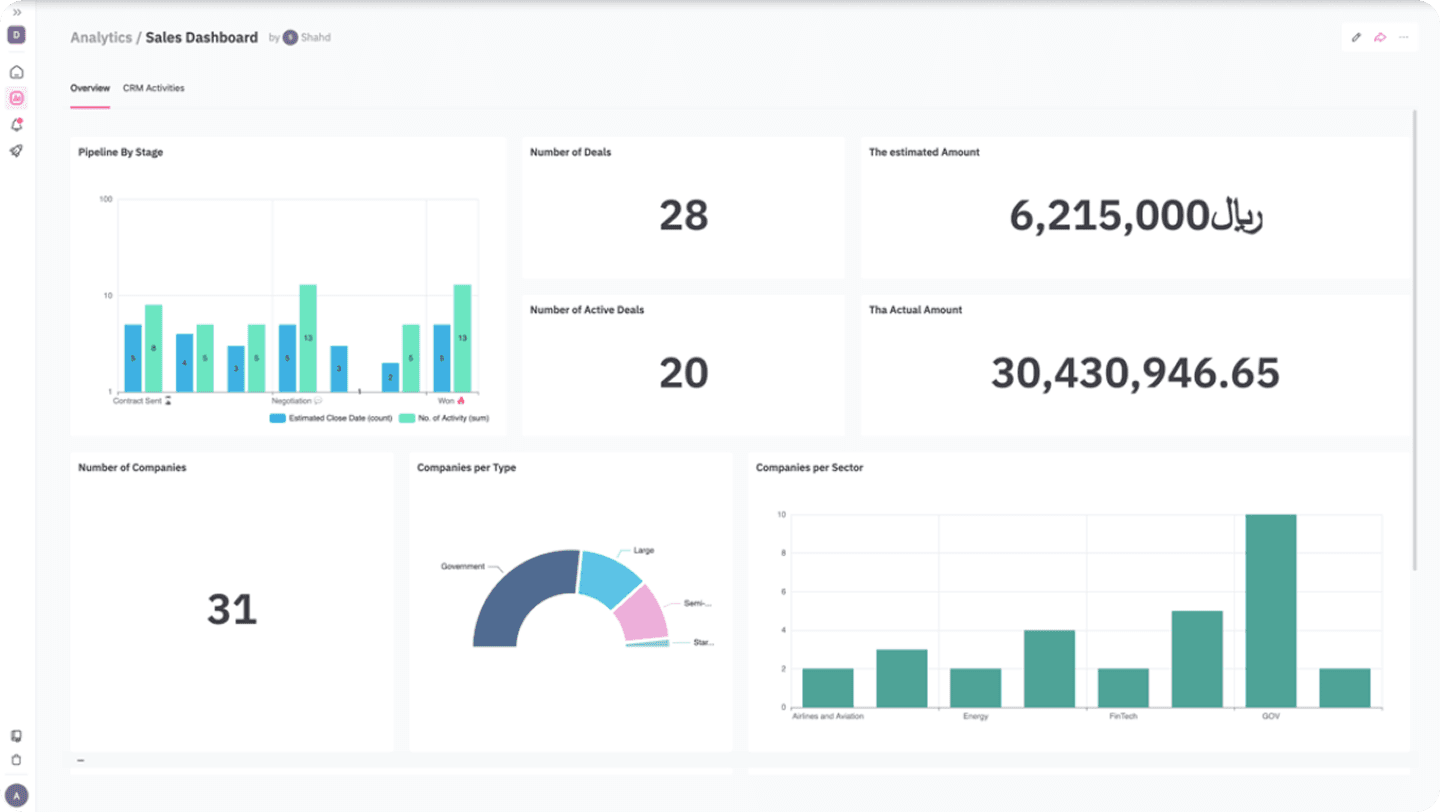
Features of Datalexing Dashboards:
In a world increasingly reliant on data for decision-making, Datalexing dashboards are an essential tool for any organization looking to analyze its data and transform it into actionable insights. Whether you manage a small team or a large organization, these dashboards provide a flexible and integrated platform that combines ease of use with advanced functionality.
Datalexing dashboards enable you to transform numbers and data into visual representations, such as pie charts and bar graphs, making it easier to understand trends and track performance. With the ability to integrate data from different departments, you can gain a comprehensive view of your organization’s performance, allowing for efficient workflow monitoring.
Advanced Visual Representations:
Transform complex data into clear visualizations like pie charts, bar graphs, and line charts.
Help your team quickly understand performance through easy-to-read charts.
Integrated and Comprehensive Dashboards:
Create dashboards that include data and visualizations from various departments within the organization.
Provide users with a complete overview of the organization’s performance, enhancing informed decision-making.
Ease of Use and Workflow Management:
Intuitive and straightforward interface: Designed to be user-friendly, even for beginners.
Simplify team workflows by accessing all dashboards from a single interface.
Multi-Page Organization and Customization:
Create multiple pages within the same dashboard and organize them to fit user needs.
Add direct links to related tables and include descriptive text alongside visualizations.
Advanced Sharing and Permissions:
Managers can control access permissions, including viewing dashboards for other departments.
Consolidate all visualizations into a single page for a comprehensive view of the organization’s workflows and overall performance.
Data-Driven Decision Making:
View key performance indicators (KPIs) directly from dashboards.
Analyze trends and outcomes using accurate and real-time data from the primary tables.
Datalexing Pricing
Datalexing offers tiered plans tailored to meet the needs of various organizations, ensuring robust project management capabilities and local hosting in Saudi Arabia. The price-to- feature ratio is competitive, making it a great choice for teams seeking a localized and secure solution.
Growths: 59 SAR/month per user Includes:
50,000 rows of data.
20 GB of storage.
Collaborative workspace for teams.
Local data hosting in Saudi Arabia.
Instant live reports without preparation.
Pro: 119 SAR/month per user (Minimum 5 users) Includes all features of Growths, plus:
500,000 rows of data.
100 GB of storage.
Up to 5,000 attachments per month.
50 webhooks.
Priority support and professional service level agreements.
Enterprise: Available only with an annual plan (Minimum 20 users) Includes all features of Pro, plus:
5,000,000 rows of data.
1 TB of storage.
Single Sign-On (SSO).
Audit records.
Dedicated servers and account manager All listed prices refer to the yearly billing.
What is Airtable?
Airtable is a data management tool that combines the flexibility of spreadsheets with database features. It allows users to organize information in tables that support various data types such as text, numbers, files, and dates. The tool supports linking between tables and creating relationships between data, making it suitable for project management and task tracking. It is widely used by teams for flexible and customizable data.
Airtable Features
Localization
Airtable is a flexible data management tool, but it faces challenges in addressing Arabic language support and regional cybersecurity requirements.
Arabic Language Support:
Airtable lacks comprehensive support for Arabic, as it does not offer a right-to-left (RTL) interface, which can impact the user experience for Arabic-speaking users.Local Storage:
Airtable relies on global servers for data storage and does not offer local hosting options in Arabic-speaking countries, such as Saudi Arabia. This raises concerns for companies needing to comply with local data protection regulations.Regional Cybersecurity Compliance:
While Airtable provides essential security features like encryption and access control, the absence of local hosting may make it less suitable for organizations bound by strict regional cybersecurity policies, such as national data protection frameworks.
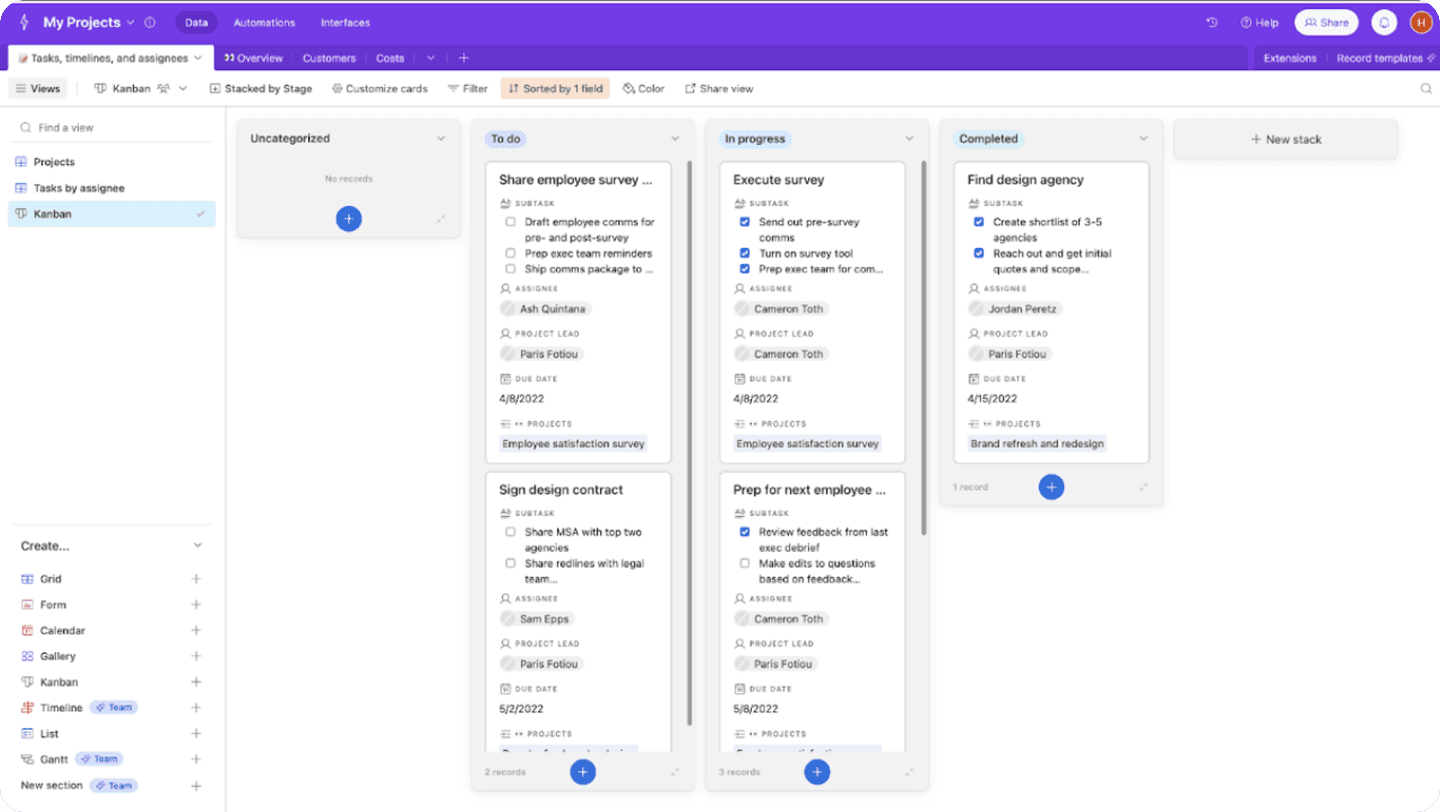
This image and its content are sourced from ClickUP. All rights reserved to their respective copyright holders.
Permission
In a robust project management system like Airtable, permission levels provide flexibility and complete control over content management, ensuring data security and assigning roles that suit business needs. The permission levels are divided into four main types:
Owner/Creator: Has full control over content, settings, and collaborator management.
Editor: Can modify content but lacks control over high-level settings or collaborator management.
Commenter: Limited to adding comments without the ability to edit content.
Read-Only: Has view-only access without any editing capabilities.
Key Actions:
Base Management:
Owner/Creator: Full access, including adding or removing collaborators.
Editor: Can edit records and views, with limited collaborator invitation options.
Commenter: Limited to adding comments.
Read-Only: Access is restricted to viewing only.
Dashboards
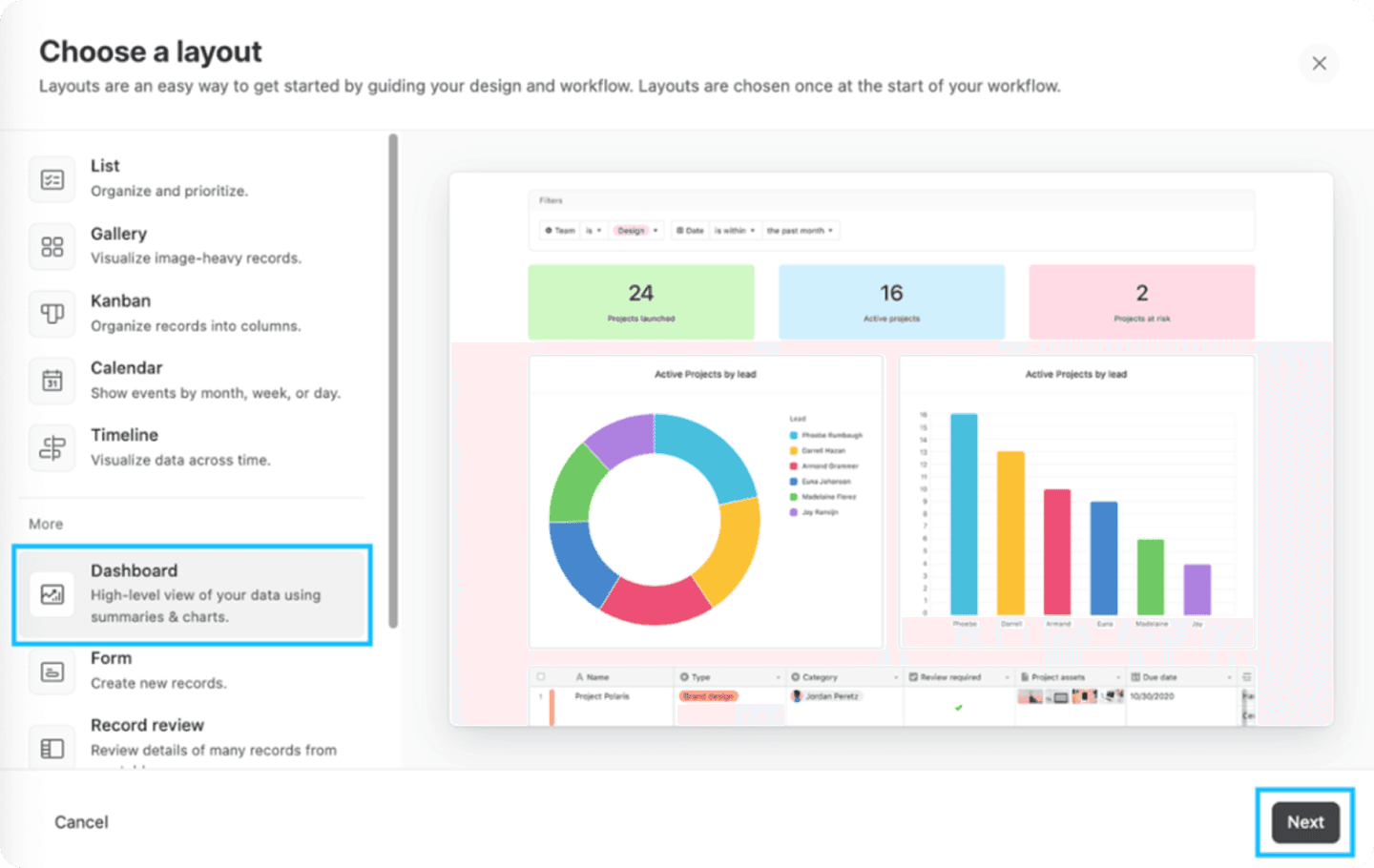
The dashboard in Airtable is an effective tool for displaying data visually and integrating it with primary tables, providing users with the ability to monitor real-time updated information. It is characterized by its ease of use and customization, allowing users to add charts and visual elements that suit their business needs. However, customization options are limited, which often pushes medium and large teams to rely on external sources and manually feed data into dashboards to achieve an ideal data visualization.
On the other hand, the dashboard supports team collaboration, as it can be easily shared with team members or external parties. However, its permission management system does not allow precise restriction of viewing or modifying certain elements, which can be a limitation in some scenarios. Performance is smooth with medium-sized data, but it may be impacted when dealing with large volumes of data, where the dashboard might experience slow loading or updates.
The dashboard provides a comprehensive view of important data but lacks advanced analytical capabilities, such as predictive analytics or sophisticated interactivity. While it supports basic interaction features like filters, it does not offer deep levels of interaction within the dashboard itself. Therefore, it is a good option for basic and straightforward use cases but may not meet the needs of users handling complex projects or large datasets.
This image and its content are sourced from ClickUP. All rights reserved to their respective copyright holders.
Airtable Pricing
Airtable provides tiered pricing plans designed to cater to different organizational needs, offering flexible tools for data organization and collaboration. The price-to-feature ratio makes it a practical choice for teams aiming for efficient project management and streamlined workflows.
Free Plan: $0/month per user Includes:
Unlimited bases.
Up to 1,200 rows per base.
2 GB of storage per base.
Collaborative workspace for small teams.
Plus Plan: $24/month per user (billed annually) or $15/month per user (billed monthly) Includes:
Up to 5,000 rows per base.
5 GB of storage per base.
Custom views and additional integrations.
Pro Plan: $54/month per user (billed annually) or $30/month per user (billed monthly) Includes all features of the Plus Plan, plus:
Up to 50,000 rows per base.
20 GB of storage per base.
Advanced calendar views, Gantt charts, and additional apps.
Priority support.
Enterprise Plan: Custom pricing (contact sales) Includes all features of the Pro Plan, plus:
Unlimited rows per base.
Advanced security features (SSO, audit logs).
Dedicated account management.
Custom workflows and integrations.
Airtable vs. Datalexing: A Features Comparison
Localization
Datalexing:
Datalexing offers comprehensive and fully integrated localization features. It provides full Arabic language support, including a right-to-left (RTL) interface, making it ideal for Arabic-speaking teams. Additionally, it relies on local data hosting within Saudi Arabia, ensuring compliance with regional data protection regulations and cybersecurity requirements.
Airtable:
While Airtable supports multiple languages, it does not offer full support for Arabic, as it lacks a right-to-left (RTL) interface, which may impact the experience for Arabic-speaking users. It also relies on global servers for data storage, lacking local hosting options. This can pose challenges
Winner:
Datalexing stands out with its full Arabic support and local hosting, ensuring alignment with regional requirements.
Permissions
Datalexing:
Datalexing offers an advanced permissions system that ensures full control over data and task access. Admins can define custom roles for each user to maintain data security.
Airtable:
While Airtable supports multiple permission levels, its granularity and flexibility are limited compared to Datalexing.
Winner: wins with its flexible and detailed permissions system.
Dashboard
Datalexing:
Datalexing excels with interactive and integrated dashboards that provide real-time data insights. These dashboards allow users to customize reports and track KPIs, making them ideal for decision-making.
Airtable:
Airtable offers dashboards, but they are less interactive and require additional setup, which can be challenging for some teams.
Winner: Datalexing outperforms with its ease of creating effective dashboards.
Datalexing Vs. Airtable: Who Wins? You Decide!
When selecting a tool to manage teams and tasks effectively while aligning with regional needs, Datalexing and Airtable offer distinct user experiences. Each platform has its strengths, but the right choice depends on your requirements and work environment:
Airtable:
Despite its popularity, Airtable lacks comprehensive Arabic support, as it does not provide a right-to-left (RTL) interface. Additionally, it relies on global servers for data storage, which makes it less suitable for organizations requiring local hosting. This limits its compliance with regional cybersecurity requirements, which can be a drawback for businesses adhering to strict local regulations.Datalexing:
Datalexing stands out with full Arabic language support, offering an RTL interface and a design tailored to Arabic-speaking users. It also provides local data hosting within Saudi Arabia, ensuring full compliance with regional cybersecurity standards. Moreover, the platform excels in integrating features seamlessly with high flexibility, making it the ideal choice for businesses aiming to manage their workflows efficiently.
If you’re looking for an easy-to-use tool with comprehensive Arabic support, local hosting, and regional cybersecurity compliance, Datalexing is the superior choice.
Datalexing Vs. Airtable: The Better Tool for Managing Teams and Tasks
Managing teams and tasks requires tools that combine clarity and flexibility, and this is where Datalexing and Airtable compete.
Datalexing
Datalexing offers a seamless and quick user experience, enabling teams to manage their tasks efficiently with interlinked tables, automation, and robust integrations. It also supports Arabic-speaking teams with localized solutions that meet security requirements and host data within Saudi Arabia. Its simple and flexible design makes it ideal for teams seeking effective management of complex data through an easy-to-use interface.Airtable
Airtable provides a wide range of features suitable for large teams managing complex projects. However, its abundance of details can overwhelm new users, resulting in a steeper learning curve and initial difficulty in leveraging its full potential.
If you aim for effective management of teams and tasks with a flexible and user-friendly interface, Datalexing is undoubtedly the superior choice.
Share