Compare Datalexing and Google Sheets to find the better tool for data management and productivity. Google Sheets offers free cloud-based spreadsheets for simple collaboration, but Datalexing goes further with an integrated platform combining AI, data analytics, Kanban boards, forms, and automated reports. With full Arabic language support and local hosting in Saudi Arabia compliant with SDAIA standards, Datalexing is the ideal choice for Arabic-speaking teams. Explore the differences in features, security, and customization.
In 2025, businesses need tools that combine flexibility and ease of use with the ability to adapt to the varying needs of teams and modern workflows. Google Sheets stands as one of the most popular tools for managing data, offering built-in features for creating and analyzing spreadsheets. On the other hand, Datalexing provides an innovative and specialized solution focusing on dynamic collaboration and flexible data management.
Whether you are seeking a tool for personal use or a platform to support real-time team collaboration, understanding the strengths and limitations of both tools will help you make an informed decision. In this article, we’ll compare Google Sheets and Datalexing to provide a comprehensive perspective that helps you choose the tool best suited to your needs.
What is Datalexing?
Datalexing is AI-native Business Work OS designed to cater to a wide range of users, from individuals to teams across various industries. It simplifies project management, task organization, and workspace coordination with its intuitive interfaces and easy-to-use features.
This all-in-one tool makes it effortless to track tasks, set goals, manage data, and automate workflows. Whether you’re a beginner or an experienced professional, Datalexing’s simple yet powerful design ensures that everyone can get the most out of it.
With features like Kanban boards, real-time collaboration, advanced dashboards, and interlinked tables, Datalexing provides everything you need to stay organized and productive. It’s fully customizable and supports the Arabic language, with localized hosting to meet regional requirements, making it a perfect fit for users in Saudi Arabia and beyond.
Datalexing bridges simplicity and functionality, offering a tool that anyone can use to streamline their projects, enhance collaboration, and achieve their goals with ease.
Datalexing Features
Let’s look at some of Datalexing best project management features and how they help you manage your goals, tasks, and resources well.
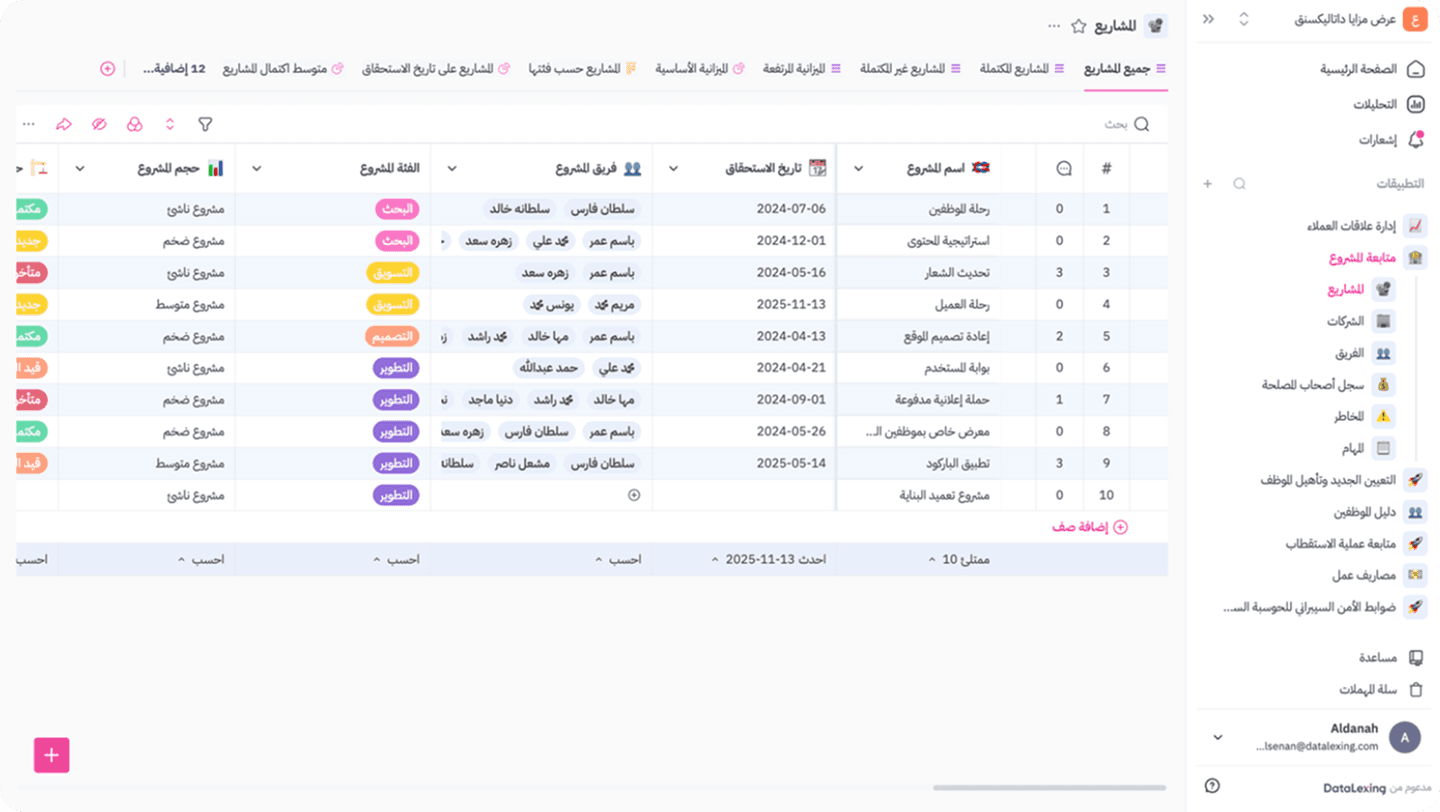
Localization
Datalexing excels in localization, offering full Arabic language support, right-to-left (RTL) interface direction, and local data hosting on servers within Saudi Arabia. This ensures compliance with local regulations and provides a seamless experience for users in the Middle East.
The platform’s deep understanding of the regional market extends beyond language and data hosting. It includes features tailored to local needs, such as support for local currencies and dual calendar systems. Datalexing’s commitment to localization ensures a natural and intuitive user experience for Arabic-speaking users.
One of Datalexing’s standout localization features is its local data hosting within Saudi Arabia. This approach complies with local cybersecurity requirements, such as those set by the National Cybersecurity Authority, ensuring the highest levels of data security and sovereignty. Organizations benefit from peace of mind, knowing their data remains within national borders, enhancing trust and data protection.
Datalexing’s localization capabilities make it a leading example of how productivity tools can be adapted to serve specific regional needs effectively, offering unmatched flexibility and compliance for businesses in the Middle East.
Permission
An advanced permission management system that allows users to define who can view or edit data, ensuring information security and confidentiality. Permissions are defined across multiple levels (workspace – application – tables – dashboard – pages). For workspaces, applications, and tables, permissions are categorized into the following levels:
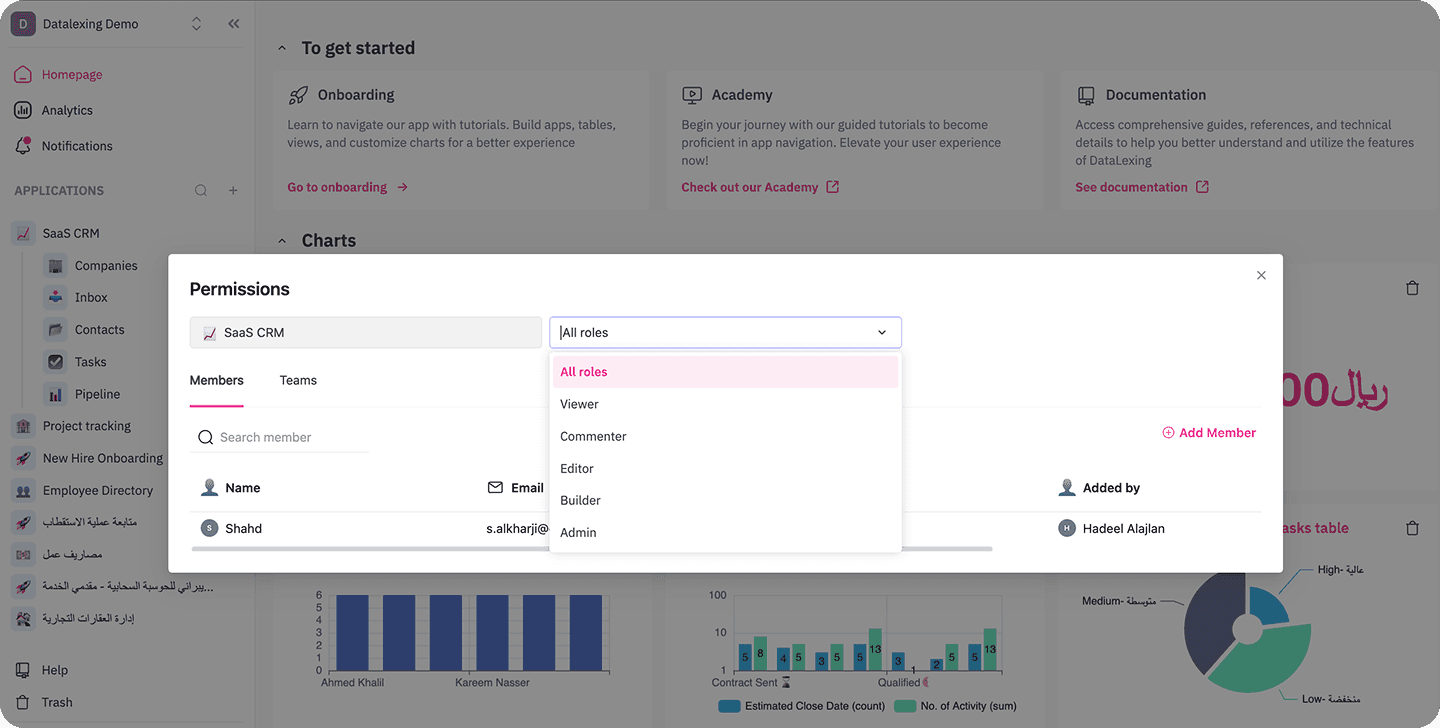
Admin
Description: Has full system permissions, including the ability to manage users, modify general settings, customize permissions, and create templates, tables, and everything that builders can do.
Key Functions:Full control over system settings.
Manage user roles and permissions.
Monitor the system and ensure compliance with security standards.
Create and customize tables and dashboards.
Builder
Description: Has permission to modify table structures and permissions (workspace – application – table levels). Builders can create and edit applications fully. They can create and manage applications, modify field names and types in tables, and perform all actions available to editors.
Editor
Description: Editors can create and edit data in tables and manage tasks. They have extensive permissions but no full control over system settings and cannot create applications or workspaces. They can perform all actions available to commenters.
Key Functions:
Add, modify, and delete data.
Manage tasks within projects.
Interact with and update dashboards.
Commenter
Description: Can only read and comment on data. Has the ability to perform all actions available to viewers.
Key Functions:
Description: Limited to viewing data without any editing capabilities. Ideal for employees or partners who need to access information without making changes.
Key Functions:
View tables, projects, and dashboards.
Filter and search data within tables.
No Access
Cannot access any content.
Column Types
Datalexing sets a new standard in task and data management with its unmatched variety of column types. With more than 25 input types, the platform offers unparalleled flexibility to meet the needs of diverse teams and projects. The columns are designed as advanced tools capable of handling both simple and complex data through intuitive and user-friendly interfaces.
Key Column Types in Datalexing:
Text Columns: Ideal for capturing essential details and adding notes.
Formula Columns: Reduce calculation errors, handle complex operations, and create logical conditions directly within the platform.Dropdown Menus: Simplify data entry with predefined options, ensuring consistency and accuracy.
Linked Data Tables: Allow integration of information across projects or tables, reducing redundancy and ensuring data consistency.AI-Powered Columns: Support data inputs by automating processes like text translation between Arabic and English, summarizing content, checking for errors, rephrasing, simplifying, and analyzing texts.
Checkbox and Toggle Columns: Perfect for tracking task statuses or binary options.Attachment Columns: Enable users to upload files, ensuring centralized and easily accessible resources.
Date Columns: Allow accurate date inputs with the ability to apply conditions.
Phone Number Columns: Ensure correct input of phone numbers, preventing invalid entries.
URL Columns: Validate correct web link formats and accept only valid entries.
Collaborator Columns: Help assign tasks to team members and specify responsibilities.
Last Updated Column: Displays the last time data was updated.
Creation Time Column: Shows the task creation time, enabling tracking of estimated completion time and applying conditional workflows.
Why Datalexing’s Columns Stand Out
The strength of Datalexing’s column system lies not only in its variety but also in its integration capabilities. Real-time updates and precise data sharing allow teams to collaborate efficiently. Whether creating comprehensive dashboards, managing complex tasks, or analyzing project performance, Datalexing’s column types deliver unmatched flexibility and power.
Datalexing Pricing
Datalexing offers tiered plans tailored to meet the needs of various organizations, ensuring robust project management capabilities and local hosting in Saudi Arabia. The price-to- feature ratio is competitive, making it a great choice for teams seeking a localized and secure solution.
Growths: 59 SAR/month per user Includes:
50,000 rows of data.
20 GB of storage.
Collaborative workspace for teams.
Local data hosting in Saudi Arabia.
Instant live reports without preparation.
Pro: 119 SAR/month per user (Minimum 5 users) Includes all features of Growths, plus:
500,000 rows of data.
100 GB of storage.
Up to 5,000 attachments per month.
50 webhooks.
Priority support and professional service level agreements.
Enterprise: Available only with an annual plan (Minimum 20 users) Includes all features of Pro, plus:
5,000,000 rows of data.
1 TB of storage.
Single Sign-On (SSO).
Audit records.
Dedicated servers and account manager All listed prices refer to the yearly billing.
What is GoogleSheet?
Google Sheets is a web-based spreadsheet tool that allows users to create, edit, and manage data in structured formats such as rows and columns. It supports basic functions like data entry, formulas for calculations, creating charts, and analyzing datasets. The platform allows real-time collaboration, enabling multiple users to work on the same sheet simultaneously. It integrates with other Google services, like Google Drive and Google Docs, for seamless file sharing and storage. However, it may struggle with handling very large datasets or advanced data analysis tasks compared to desktop software like Microsoft Excel.
GoogleSheet Features
Localization
Google Sheets supports multiple languages and can adjust its interface and formatting based on the user's regional settings. For example, date and currency formats adapt to the chosen locale. However, it lacks full support for right-to-left (RTL) languages like Arabic, which may cause alignment issues for users working with such scripts.
Permissions
Google Sheets offers robust permission controls, allowing users to share documents with specific individuals or groups. Permissions can be set as "view-only," "comment-only," or "edit access." Additionally, changes are logged with version history, ensuring accountability. However, managing permissions for larger teams can become cumbersome, especially without integration with an organization-wide system like Google Workspace.
This image and its content are sourced from GoogleSheets. All rights reserved to their respective copyright holders.
View-Only Access: Users can only view the content of the sheet without making edits or comments.
Comment-Only Access: Users can add comments to specific cells or ranges without modifying the data.
Edit Access: Users can make changes to the data, structure, and formulas within the sheet.
Owner Access: The owner has full control over the file, including changing permissions and deleting or transferring ownership.
Column Types
Google Sheets supports a range of column types such as text, numbers, dates, and checkboxes. It also allows custom data validation to restrict entries to predefined formats. However, advanced column features like linked fields or formulas that interact across multiple sheets require manual setup, which may be time-consuming for users handling complex datasets.
This image and its content are sourced from GoogleSheets. All rights reserved to their respective copyright holders.
Text: Used for alphanumeric data, labels, or plain text.
Number: Supports numeric data for calculations or raw numbers.
Date and Time: Handles dates and times with various formats.
Checkbox: A binary input for "true/false" or "yes/no" functionality.
Dropdown (Data Validation): Allows the creation of a list of predefined values for a cell or column.
Currency: A numeric format displayed with currency symbols.
Percentages: Numeric data formatted as a percentage.
Custom Formats: User-defined formats for specific types of data, such as phone numbers or zip codes.
Formulas: Dynamic calculations or logic applied to data.
These inputs allow for a range of applications in Google Sheets, but it does not have a strict number of "column types" as they are user-defined based on the formatting and data validation settings. If you need advanced column types like linked tables or multi-layered columns, those would require manual customization or external tools.
GoogleSheet Pricing
Google Sheets is available for free as part of the Google Docs Editors suite, offering essential spreadsheet functionalities suitable for individual use. For enhanced features and business-oriented tools, Google provides Google Workspace plans, which include Google Sheets along with other applications. The pricing for these plans is as follows:
Business Starter: $6 USD per user per month, with a 1-year commitment.
Business Standard: $12 USD per user per month, with a 1-year commitment.
Business Plus: $18 USD per user per month, with a 1-year commitment.
Enterprise: Custom pricing; contact sales for details.
Each plan offers varying levels of storage, collaboration tools, and administrative controls to cater to different organizational needs.
GoogleSheet Vs. Datalexing: A Features Comparison
Localization
Google Sheets: Google Sheets supports multiple languages and adjusts to regional settings, including date and currency formats. However, it lacks full support for right-to-left (RTL) languages like Arabic, making it less ideal for Arabic-speaking users.
Datalexing: Datalexing offers complete Arabic support with a fully localized right-to-left (RTL) interface and ensures data hosting within Saudi Arabia, meeting local regulations and providing a seamless experience for Arabic-speaking teams.
Winner: Datalexing, for its comprehensive localization and Arabic language support.
Permission Management
Google Sheets: Google Sheets allows flexible permission settings, including "View," "Comment," and "Edit" access levels. However, managing permissions for large teams can be cumbersome without integrating Google Workspace.
Datalexing: Datalexing offers advanced permission controls with multi-level user roles, ensuring granular access control for data security. This is particularly beneficial for organizations requiring precise management of sensitive information.
Winner: Datalexing, for its advanced multi-level permissions.
Column Types
Google Sheets: Supports basic data types like text, numbers, dates, checkboxes, and dropdowns. Advanced functionalities like linking data across tables or conditional logic require manual configurations or external tools.
Datalexing: Provides over 25 column types, including linked tables, formulas, dropdowns, and conditional logic, offering a more robust and versatile system for managing complex workflows.
Winner: Datalexing, for its extensive variety of column types and advanced data management capabilities.
GoogleSheet Vs. Datalexing: Who Wins? Who Loses? You Decide
When comparing Google Sheets and Datalexing, the choice depends on your team’s needs and project complexity. Both tools offer unique advantages, but each caters to different users and use cases:
Google Sheets is excellent for basic data management and individual use. It’s highly accessible and works seamlessly with other Google tools. However, it lacks advanced features like localized right-to-left support, multi-level permissions, and advanced column types, which can limit its efficiency for complex workflows or team collaboration.
Datalexing, on the other hand, is designed for teams managing advanced workflows. With features like full Arabic support, local data hosting in Saudi Arabia, advanced task tracking, and robust permissions, it provides a powerful and secure environment for professional teams.
Which one should you choose?
Choose Datalexing if you require advanced features, localized support, and tools tailored for complex workflows.
GoogleSheet Vs. Datalexing: The Better Productivity Tool
Google Sheets
Best for: Individuals and small teams managing basic data.
Strengths: Easy to use, integrates well with Google tools, and offers essential data handling.
Limitations: Lacks advanced localization, robust permission controls, and versatile column types for complex workflows.
Datalexing
Best for: Teams in the Middle East needing localized solutions, secure hosting, and advanced data management tools.
Strengths: Full Arabic support, advanced column options, and tools for real-time collaboration and tracking.
Conclusion:
Google Sheets shines in simplicity and integration but is less suited for advanced workflows or regional needs.
Datalexing is the ideal choice for businesses requiring advanced features, localization, and secure collaboration.
Share