Compare Datalexing and Monday.com to discover the best platform for project management and team productivity. Monday.com offers a flexible global work management platform, while Datalexing provides a Saudi AI-native Work OS that unifies task management, data analytics, automation, and reporting in one platform with full Arabic support. Learn about the differences in dashboards, integrations, user permissions, and pricing to make the right decision for your team and projects.
Managing teams and projects goes beyond organizing tasks—it’s a sophisticated challenge requiring seamless coordination across goals, teams, and resources. The choice of a management tool can determine the difference between efficient execution and operational chaos.
The market in 2025 offers a range of tools, from basic task organizers to advanced platforms promising robust functionality. Selecting the right one is a critical decision.
To help you make an informed choice, we’ve compared two popular tools—Monday.com and Datalexing.
Let’s delve into the details to determine the better fit for your management needs.
What is Datalexing?
Datalexing is AI-native Business Work OS that not only help you organize work but also play a key role in improving your team’s efficiency and achieving goals faster and more seamlessly. With Datalexing, you no longer need to waste time on repetitive data entry or worry about errors in your records. Datalexing offers you a comprehensive solution built around interconnected tables, enabling precise data organization while making it easy to access information and collaborate with your team anytime, anywhere.
What sets Datalexing apart is the platform is fully compliant with the standards of cybersecurity, meeting the requirements of the National Cybersecurity Authority to provide you with a secure and reliable workspace. Moreover, its full Arabic language support, making it an ideal choice for businesses and organizations in the Arab region.
Datalexing goes beyond serving a single department. Whether you're working in HR, sales, project management, or finance, the platform delivers tailored solutions to suit your needs. With its advanced project management templates, you can effortlessly track project tasks, monitor budgets, and automate time-consuming workflows.
Furthermore, the tool offers interactive dashboards linked to tables, helping you make data-driven decisions, multiple display options for personalized workflows, and specific input types to minimize errors and maintain data accuracy.
But that’s not all—Datalexing brings advanced computational capabilities, allowing you to perform complex calculations with ease, and inter-table linking to facilitate seamless data sharing between different teams and departments. These features empower teams to work in harmony, increase efficiency, and drive project success.
Whether you’re managing a small project or a large-scale initiative, Datalexing provides the tools you need to simplify your operations, foster team collaboration, and deliver tangible results in less time and with less effort.
Best Practices for Creating a Roadmap for Consistent Product Updates
Creating a roadmap for product updates requires careful planning, clear goals, and consistent communication. By following these best practices, teams can stay on track and ensure a steady flow of improvements.
Datalexing Features
Let’s look at some of Datalexing best project management features and how they help you manage your goals, tasks, and resources well.
Localization
Datalexing excels in localization, offering full Arabic language support, right-to-left (RTL) interface direction, and local data hosting on servers within Saudi Arabia. This ensures compliance with local regulations and provides a seamless experience for users in the Middle East.
The platform’s deep understanding of the regional market extends beyond language and data hosting. It includes features tailored to local needs, such as support for local currencies and dual calendar systems. Datalexing’s commitment to localization ensures a natural and intuitive user experience for Arabic-speaking users.
One of Datalexing’s standout localization features is its local data hosting within Saudi Arabia. This approach complies with local cybersecurity requirements, such as those set by the National Cybersecurity Authority, ensuring the highest levels of data security and sovereignty. Organizations benefit from peace of mind, knowing their data remains within national borders, enhancing trust and data protection.
Datalexing’s localization capabilities make it a leading example of how productivity tools can be adapted to serve specific regional needs effectively, offering unmatched flexibility and compliance for businesses in the Middle East.
Project Management
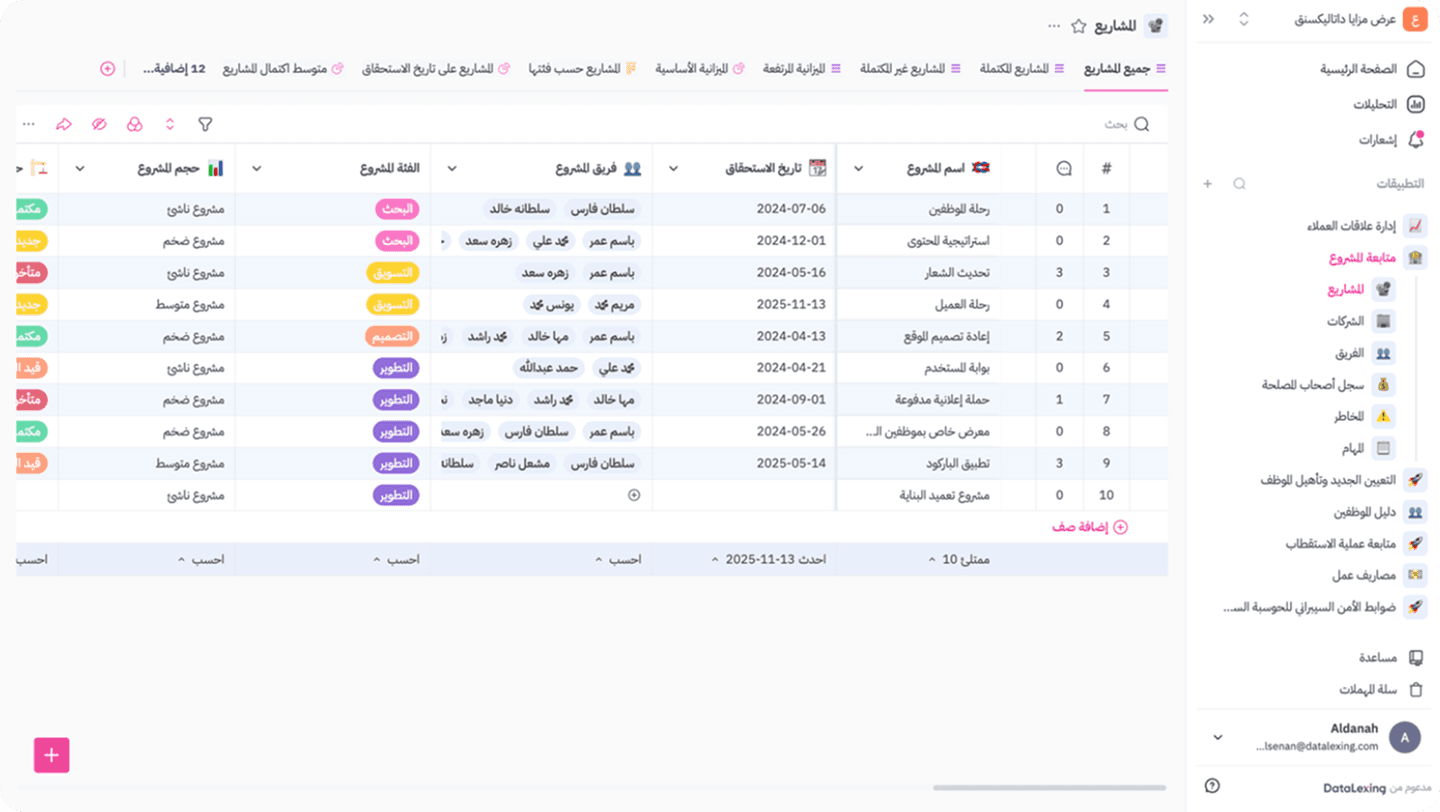
A Unique Experience That Transforms Complexity into Simplicity and Organization. With Datalexing, you can manage all aspects of your project with flexibility and precision. The platform offers innovative tools to create projects and track all related tasks in one place. You can easily assign tasks to the right team members while monitoring the progress of each task in real-time through comprehensive reports and interactive dashboards.
Additionally, the platform provides a dedicated space for discussions within each task, allowing team members to exchange comments, ideas, and files with ease and efficiency. Instant notifications ensure everyone stays updated with any new changes, enhancing effective collaboration and preventing any delays in the workflow.
With Datalexing, team collaboration becomes more efficient, and organization becomes clearer, making it the ideal tool for companies aiming to manage their projects effectively and precisely.
Comprehensive Management for Every Project Detail
With Datalexing, project management becomes an organized and efficient experience. You can create projects that include all key details, from setting goals and timelines to tracking progress step by step.
Each project is organized within a dynamic dashboard that displays tasks in a clear and easy-to-follow manner.
The smart tools allow you to track project progress in real-time through interactive reports and dashboards.
Clear and Flexible Task Assignment
One of Datalexing's standout features is the ease of assigning tasks to team members.
Managers can clearly allocate tasks to each team member based on their roles and skills.
Each project-related task is automatically updated within the system, ensuring everyone is aware of their responsibilities and work progress.
Accurate Time and Budget Tracking
Datalexing goes beyond task management by offering powerful tools for tracking time and budget.
You can set project timelines and monitor adherence using time-tracking tools.
The platform allows for budget allocation to each project and monitors spending against the plan, helping keep the project within the defined budget.
Detailed reports provide clear insights into all financial and time-related aspects, making it easier to make quick and accurate decisions.
With Datalexing, companies gain the perfect solution to manage projects from all angles, from daily tasks to efficient and transparent management of time and financial resources.
Formulas
Formulas in Datalexing are a powerful and flexible tool that allows users to perform custom and complex calculations within tables with ease. You can use formulas to apply various averages and conditions to your data, perform mathematical operations, transform text, or even create logical conditions tailored to your project’s needs.
Formulas fully integrate with the data within tables, enabling real-time calculations such as summing numbers, determining percentages, or creating custom equations based on specific cells. This feature enhances data management and analysis, making it more efficient and precise, allowing users to design custom formulas that meet their unique requirements without relying on external tools.
In summary, formulas in Datalexing add a layer of intelligence and flexibility to project and task management, helping teams enhance their productivity and make informed decisions quickly.
Uses of Formulas in Datalexing
Formulas in Datalexing are one of the most powerful and flexible tools, offering users limitless possibilities to analyze data, perform calculations, and organize information intelligently and efficiently, with more then 75 type of formulas. This feature allows you to customize results based on project needs, enhancing the team’s ability to manage projects and tasks effectively. Below are the main uses of formulas in Datalexing:
Basic Mathematical Calculations
Addition and Subtraction: Formulas can be used for simple mathematical operations, such as summing columns or subtracting values between fields.
Percentage Calculations: Create formulas to calculate progress percentages, budget usage, or other ratios.
Averages: Calculate the average values across columns, such as the time taken to complete tasks or the remaining budget.
Logical Operations and Decision Making
IF Statements: Create conditional formulas that display specific results based on given conditions.
Example: If a task is overdue, show "Overdue," and if it is on schedule, show "On Time."
Data Categorization: Organize data based on specific conditions, such as prioritizing tasks (Urgent, Medium, Low).
Text and Data Processing
Text Merging: Use formulas to combine text from multiple columns.
Example: Combine a task name with its assigned member to display "Task: Data Analysis - Assigned to: Ahmed."
Text Manipulation: Trim or modify text to remove extra characters or adjust formatting.
Example: Extract the first three characters from a project name.
Time and Deadline Tracking
Duration Calculations: Create formulas to measure the time difference between two dates (start and end date) to determine the task duration.
Deadline Monitoring: Calculate the number of days remaining until a task’s deadline.
Example: If the deadline is less than three days away, display "Urgent" to alert the team.
Budget and Resource Tracking
Expense Monitoring: Use formulas to calculate total expenses against the planned budget.
Example: If expenses exceed 80% of the budget, display an automatic warning.
Resource Allocation: Calculate resource distribution across departments based on specified values.
Enhancing Performance Reports and Dashboards
Ease of Use: Datalexing provides a simplified interface for creating formulas without requiring programming knowledge.
Real-Time Interactivity: Values are updated automatically as soon as input data changes.
High Flexibility: Formulas can be customized to suit all types of projects, from small-scale to large-scale initiatives.
Datalexing Pricing
Datalexing offers tiered plans tailored to meet the needs of various organizations, ensuring robust project management capabilities and local hosting in Saudi Arabia. The price-to- feature ratio is competitive, making it a great choice for teams seeking a localized and secure solution.
Growths: 59 SAR/month per user Includes:
50,000 rows of data.
20 GB of storage.
Collaborative workspace for teams.
Local data hosting in Saudi Arabia.
Instant live reports without preparation.
Pro: 119 SAR/month per user (Minimum 5 users) Includes all features of Growths, plus:
500,000 rows of data.
100 GB of storage.
Up to 5,000 attachments per month.
50 webhooks.
Priority support and professional service level agreements.
Enterprise: Available only with an annual plan (Minimum 20 users) Includes all features of Pro, plus:
5,000,000 rows of data.
1 TB of storage.
Single Sign-On (SSO).
Audit records.
Dedicated servers and account manager All listed prices refer to the yearly billing.
What is Monday.com?
Monday.com is a cloud-based Work Operating System (Work OS) designed to streamline workflow management for individuals, teams, and organizations. It offers a flexible platform to organize tasks, projects, and processes through visual boards, integrations, and customizable workflows.
Monday.com is particularly useful for project management, task tracking, and team collaboration, making it an accessible solution for businesses of all sizes. However, it has limitations in comparison to more feature-rich platforms, particularly in terms of localized capabilities and advanced functions.
Monday.com Features
Localization
Monday.com offers multilingual support, making it accessible to a diverse range of users worldwide. This feature allows users to navigate the platform in several major languages, which is beneficial for international teams. However, the platform's localization capabilities are limited when it comes to accommodating the specific needs of regional users.
For instance, Monday.com does not fully support the Arabic language, as it lacks a right-to-left (RTL) text alignment interface, which is essential for creating a seamless experience for Arabic-speaking users. This limitation impacts not only readability but also the overall user experience, as Arabic-speaking teams may find it cumbersome to use the platform effectively.
Furthermore, Monday.com does not offer region-specific adaptations, such as local currencies, calendars, or compliance with regional data protection regulations. This can create challenges for companies operating in areas like the Middle East, where such features are often critical for aligning with local business practices and ensuring user satisfaction.
While Monday.com is a powerful tool with robust multilingual support, its lack of comprehensive localization for Arabic-speaking regions may hinder its usability and effectiveness for teams in these markets. Companies looking for a platform that aligns with their regional needs may find these limitations a significant drawback.
Project Management
Monday.com is a well-known platform for project management, offering a variety of tools that make it easier for teams to plan and organize tasks and projects. The platform allows users to create flexible workboards that can be customized to meet the needs of different projects. Progress can be tracked using multiple views, such as spreadsheets, Kanban boards, and timelines. Additionally, Monday.com provides features like task assignment to team members, automated notifications, and more. However, there are some limitations users may encounter when utilizing these features.
This image and its content are sourced from Monday. All rights reserved to their respective copyright holders.
Features and Limitations:
Ease of Use:
The interface of Monday.com is designed to be simple and easy to learn, making it suitable for new users. However, with large and complex projects that include numerous boards and tasks, the interface can become less intuitive to navigate, leading to confusion for some new users.Customization:
The platform offers flexibility in modifying boards to suit different project types, such as changing fields and adding columns. However, more advanced customizations may require technical expertise or longer implementation times, which can be frustrating for teams in need of quick solutions.Effective Collaboration:
Tools for sharing files and comments within tasks make collaboration among team members easier. However, discussions can become complicated and disorganized if the number of comments within a task grows, making it challenging to track important points.
Formulas
Formulas in Monday.com are a flexible tool that allows users to perform calculations and analyze data within boards. Formulas are used to customize data, perform operations such as addition and subtraction, and create logical conditions to simplify workflows. Users can easily create formulas using a simplified interface that does not require advanced technical expertise. Formulas enable data customization according to project needs, such as calculating progress or budgets.
They interact directly with data changes, ensuring real-time accuracy of information. However, some advanced operations or complex formulas may not be supported, requiring the use of external tools. As data volume and board complexity increase, managing and running formulas may become less efficient.
Formulas in Monday.com are a powerful tool for simplifying calculations and analyzing data, but they may face limitations in large projects or when advanced customizations are required.
Monday.com Pricing
Monday.com offers multiple pricing plans to fit different team sizes and project needs, with features designed to enhance collaboration and workflow management.
Free Plan: €0/month (Up to 2 seats)
Includes:Up to 3 boards.
Unlimited docs.
Access to 200+ templates.
Basic Plan: €12/seat per month
Includes:Unlimited items.
5 GB of file storage.
Dashboards based on one board.
Standard Plan: €14/seat per month
Includes:Timeline and Gantt views.
Calendar view.
Automations (250 actions/month).
Dashboards combining up to 5 boards.
Pro Plan: €24/seat per month
Includes:Private boards.
Time tracking.
Automations (25,000 actions/month).
Dashboards combining up to 20 boards.
Enterprise Plan: Custom Pricing
Includes advanced security, analytics, and custom onboarding tailored to large organizations.
All prices are based on monthly billing.
Comparison Between Monday.com and Datalexing: Feature Focus
Localization and Language Support
Datalexing: Provides full Arabic language support, including a right-to-left (RTL) interface, along with local data hosting within Saudi Arabia. This ensures compliance with regional cybersecurity regulations and offers a seamless experience for Arabic-speaking users.
Monday.com: Supports multiple languages but does not provide full support for Arabic. It lacks RTL alignment and relies on global servers, making it less suitable for companies that require local hosting.
Winner: Datalexing for its comprehensive localization and Arabic language support.
Project and Task Management
Datalexing: Offers advanced tools for project and task management, including interlinked tables, Kanban, surveys, and gallery views, enabling real-time progress tracking. It also supports time and budget monitoring, allowing teams to manage resources effectively.
Monday.com: Provides flexible boards and multiple views like Kanban and Gantt charts, but complex customizations often require additional effort or technical skills.
Winner: Datalexing for its efficiency in offering a wide range of formulas and conditions, in addition to its ease of use.
Monday.com Vs. Datalexing: Who Wins? Who Loses? You Decide
When choosing between Monday.com and Datalexing, it’s important to assess which platform aligns better with your team’s needs. Here’s a direct comparison to help you decide:
For teams requiring Arabic support, local hosting, and advanced customizations, Datalexing stands out.
For teams prioritizing task visualization and basic workflows, Monday.com might suffice.
Monday.com Vs. Datalexing: The Better Productivity Tool
Monday.com
Best for: Teams looking for task visualization with multiple views such as Kanban and Gantt, along with basic automation for workflows.
Limitations:
Limited Arabic support, lacking right-to-left (RTL) alignment for better usability by Arabic-speaking teams.
Relies on global servers, making it less compliant with local data regulations in regions like the Middle East.
Complex features like detailed automations or workflows often require extra setup time or technical expertise.
Datalexing
Best for: Businesses needing a platform with Arabic support, local hosting in Saudi Arabia, and advanced tools for task management and data integration.
Strengths:
Full Arabic support with a right-to-left (RTL) interface, making it ideal for Arabic-speaking teams.
Local data hosting ensures compliance with regional cybersecurity requirements.
Seamless integration with global tools (e.g., Google Drive, Slack, and Microsoft apps) while maintaining a focus on localized solutions.
Advanced automation, customizable dashboards, and comprehensive formulas for both simple and complex operations.
Which to choose?
Choose Monday.com if you prioritize a globally recognized platform with basic task visualization tools and simple workflows.
Choose Datalexing if your team values Arabic support, local hosting, and advanced features for streamlined management while still integrating with global tools.
The decision is yours: Who wins? Who loses? You decide!
Share