A comprehensive comparison between Datalexing and Trello for task and project management. Trello is known for its simple Kanban boards and ease of use, but Datalexing offers a complete Work OS that goes beyond Kanban with AI capabilities, interlinked tables, dynamic forms, interactive reports, and workflow automation. With full Arabic support and local hosting in Saudi Arabia, Datalexing is the more comprehensive solution for teams that need more than just task organization. Compare features and pricing now.
Managing a Task goes beyond organizing tasks—it’s a complex challenge that demands seamless coordination between goals, Deadline, and resources. The tool you choose for tasks management can make all the difference between success and chaos.
In today’s market, there’s an overwhelming number of Tasks management tools available. From simple task list apps to advanced platforms offering complete customization, the choices are vast, making the decision process both critical and complex.
If you’re looking for the best task management tool in 2025, we’re here to guide you.
We’ve conducted a detailed comparison between two of the most popular tools on the market—Trello and Datalexing.
From features, we’ll give you an in-depth look to help you decide which tool is the perfect fit for your Tasks management needs.
What is Datalexing?
Datalexing is AI-native Business Work OS designed to cater to a wide range of users, from individuals to teams across various industries. It simplifies project management, task organization, and workspace coordination with its intuitive interfaces and easy-to-use features.
This all-in-one tool makes it effortless to track tasks, set goals, manage data, and automate workflows. Whether you’re a beginner or an experienced professional, Datalexing’s simple yet powerful design ensures that everyone can get the most out of it.
With features like Kanban boards, real-time collaboration, advanced dashboards, and interlinked tables, Datalexing provides everything you need to stay organized and productive. It’s fully customizable and supports the Arabic language, with localized hosting to meet regional requirements, making it a perfect fit for users in Saudi Arabia and beyond.
Datalexing bridges simplicity and functionality, offering a tool that anyone can use to streamline their projects, enhance collaboration, and achieve their goals with ease.
Datalexing Features
Let’s look at some of Datalexing best project management features and how they help you manage your goals, tasks, and resources well.
Kanban
Datalexing’s Kanban boards are exceptionally flexible, allowing users to customize the information displayed, hide irrelevant data, and adapt workflows to fit their unique needs. This flexibility makes the tool particularly suitable for managing complex projects involving multiple levels of data.
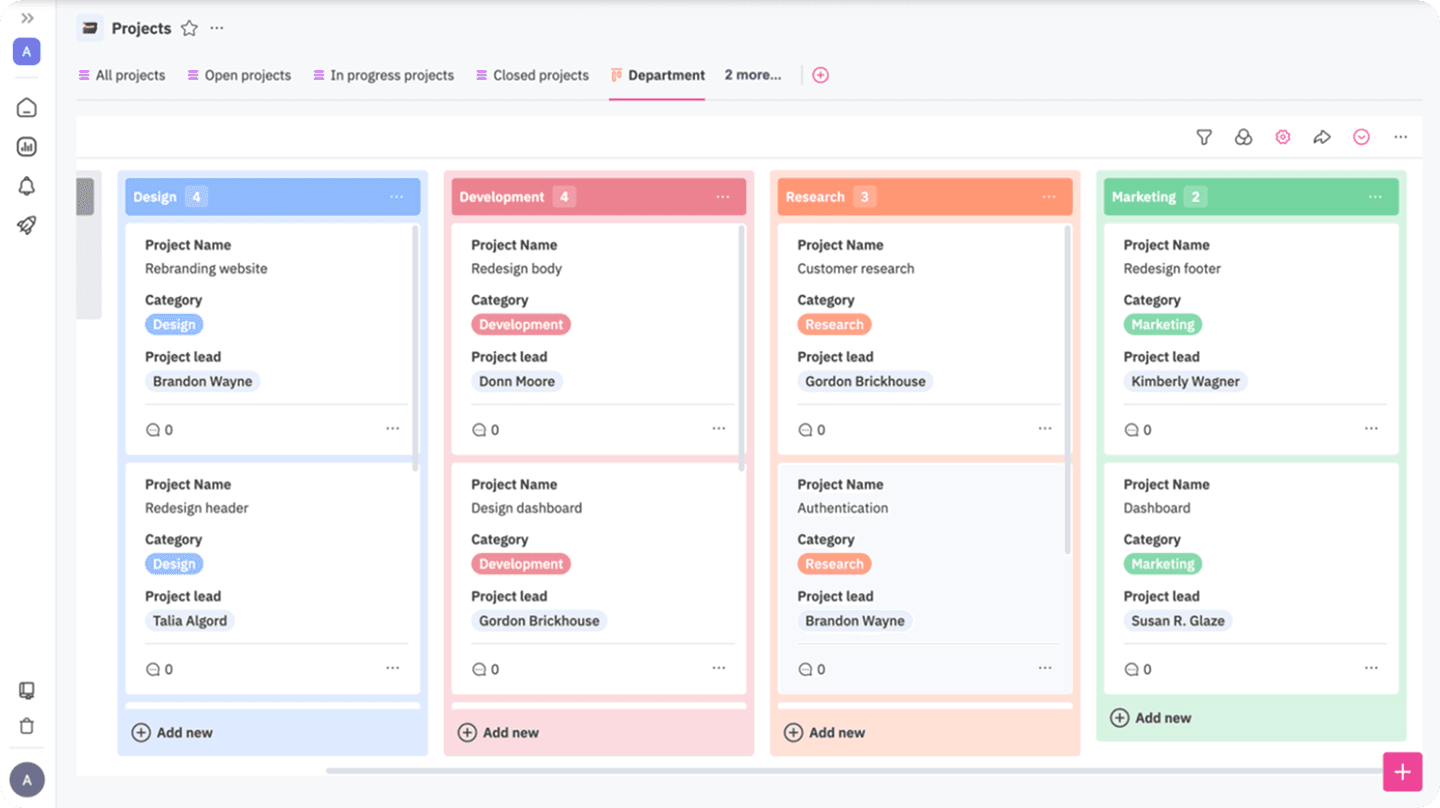
Key Features:
Data Customization:
Users can control what appears on the Kanban board, hiding unnecessary data to focus only on relevant information, leading to a more organized and distraction-free workflow.Workflow Adaptability:
Supports the customization and reordering of Kanban columns to align with each project’s unique needs, whether tracking multiple stages or prioritizing tasks.Integration with Interlinked Tables
Kanban boards can integrate seamlessly with interlinked tables, enabling direct access to detailed and accurate data for analysis.Dynamic Coloring:
Offers color-coding options to categorize tasks by priority, status, or type, providing immediate visual clarity for project status.Handling Multiple Data Levels:
Supports managing multiple data layers within a single project, making it ideal for organizations handling complex, multi-department projects.Ease of Customization:
Users can create custom columns, add new classifications, and redefine workflow stages easily without technical complexity.
Task Management
Datalexing offers an efficient and user-friendly way to manage tasks, making it the ideal choice for teams seeking streamlined organization. Users can create tasks linked to multiple projects, including detailed descriptions, and assign tasks or even subtasks to team members. Deadlines can be set, and progress can be tracked in real-time. The platform supports task dependencies, allowing teams to link tasks and ensure consistent workflows, reducing delays and miscommunication. Team members can also easily track tasks and communicate within the task or subtask space.
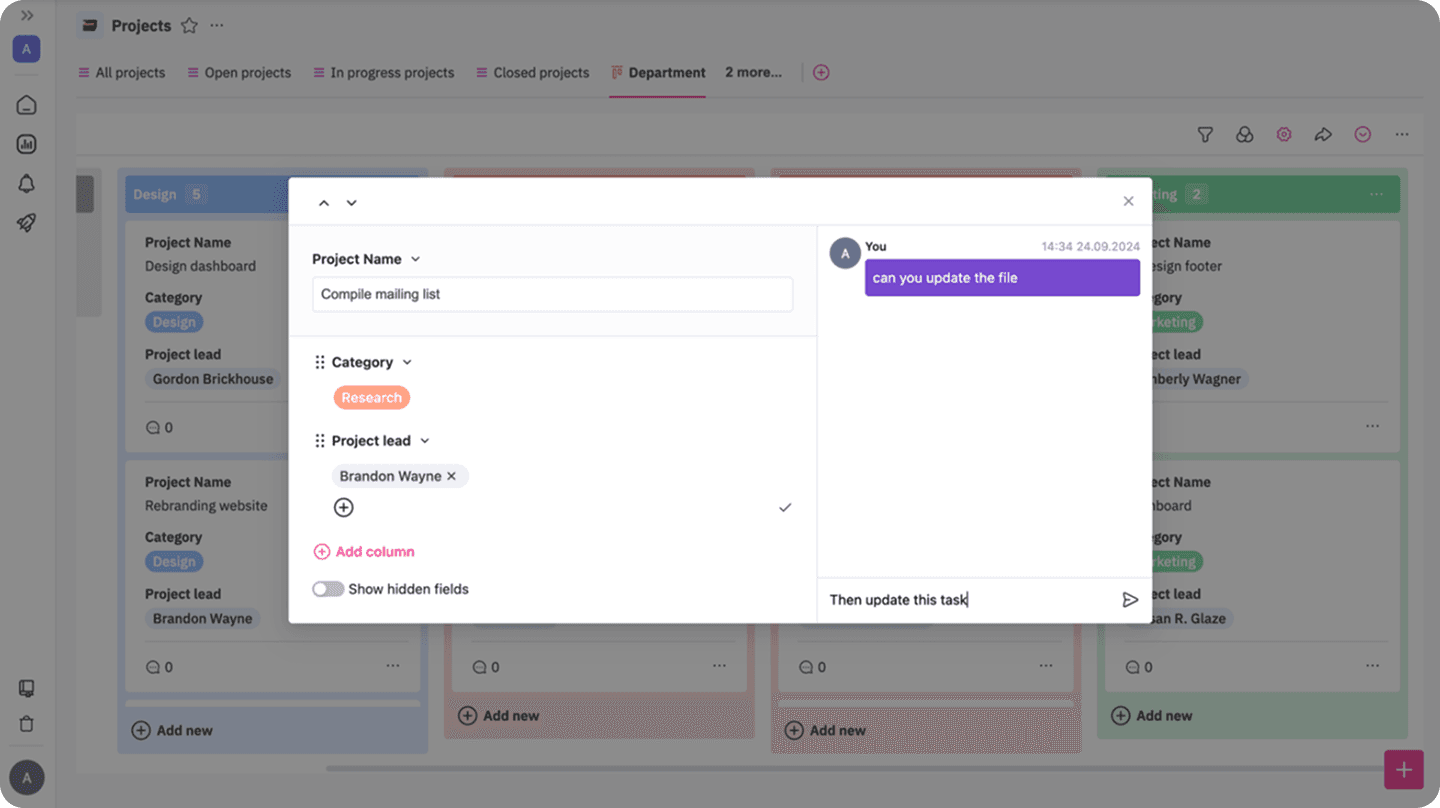
Datalexing provides a centralized system for organizing tasks and data, along with advanced views such as Kanban, gallery view, and charts, ensuring all details are centralized for better clarity. It enhances collaboration and simplifies task tracking, enabling team members to share updates, exchange files, and comment without switching between tools.
Why Datalexing Excels?
Diverse task views for better organization.
Management of both main tasks and subtasks.
Flexible tools for task customization and assigning responsibilities.
Built-in discussion spaces for seamless collaboration within tasks.
Column Types
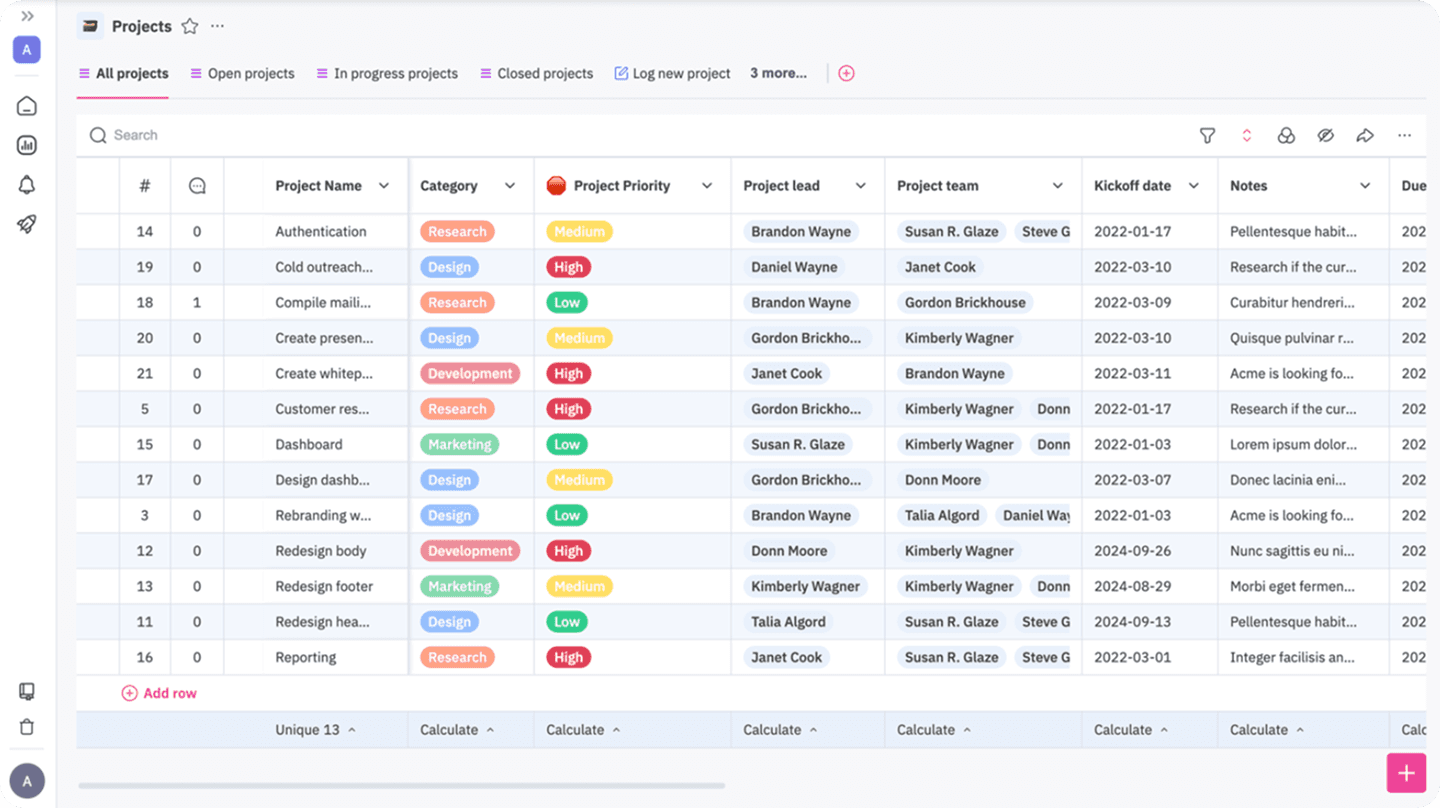
Datalexing sets a new standard in task and data management with its unmatched variety of column types. With more than 25 input types, the platform offers unparalleled flexibility to meet the needs of diverse teams and projects. The columns are designed as advanced tools capable of handling both simple and complex data through intuitive and user-friendly interfaces.
Key Column Types in Datalexing:
Text Columns: Ideal for capturing essential details and adding notes.
Formula Columns: Reduce calculation errors, handle complex operations, and create logical conditions directly within the platform.
Dropdown Menus: Simplify data entry with predefined options, ensuring consistency and accuracy.
Linked Data Tables: Allow integration of information across projects or tables, reducing redundancy and ensuring data consistency.AI-Powered Columns: Support data inputs by automating processes like text translation between Arabic and English, summarizing content, checking for errors, rephrasing, simplifying, and analyzing texts.
Checkbox and Toggle Columns: Perfect for tracking task statuses or binary options.
Attachment Columns: Enable users to upload files, ensuring centralized and easily accessible resources.
Date Columns: Allow accurate date inputs with the ability to apply conditions.
Phone Number Columns: Ensure correct input of phone numbers, preventing invalid entries.
URL Columns: Validate correct web link formats and accept only valid entries.
Collaborator Columns: Help assign tasks to team members and specify responsibilities.
Last Updated Column: Displays the last time data was updated.
Creation Time Column: Shows the task creation time, enabling tracking of estimated completion time and applying conditional workflows.
Why Datalexing’s Columns Stand Out
The strength of Datalexing’s column system lies not only in its variety but also in its integration capabilities. Real-time updates and precise data sharing allow teams to collaborate efficiently. Whether creating comprehensive dashboards, managing complex tasks, or analyzing project performance, Datalexing’s column types deliver unmatched flexibility and power.
Datalexing Pricing
Datalexing offers tiered plans tailored to meet the needs of various organizations, ensuring robust project management capabilities and local hosting in Saudi Arabia. The price-to- feature ratio is competitive, making it a great choice for teams seeking a localized and secure solution.
Growths: 59 SAR/month per user Includes:
50,000 rows of data.
20 GB of storage.
Collaborative workspace for teams.
Local data hosting in Saudi Arabia.
Instant live reports without preparation.
Pro: 119 SAR/month per user (Minimum 5 users) Includes all features of Growths, plus:
500,000 rows of data.
100 GB of storage.
Up to 5,000 attachments per month.
50 webhooks.
Priority support and professional service level agreements.
Enterprise: Available only with an annual plan (Minimum 20 users) Includes all features of Pro, plus:
5,000,000 rows of data.
1 TB of storage.
Single Sign-On (SSO).
Audit records.
Dedicated servers and account manager All listed prices refer to the yearly billing.
What is Trello?
Trello Features
Kanban
Trello’s Kanban system offers a simple and visual way to manage tasks by organizing them into cards that can be moved across customizable columns like "To Do," "In Progress," and "Done." This approach is user-friendly and intuitive, making it a great choice for smaller teams or projects that prioritize clarity. However, as projects grow or complexity, the Kanban boards can become cluttered, requiring more effort to navigate and organize effectively. The system also lacks advanced features such as task dependencies, which are often necessary for complex workflows.
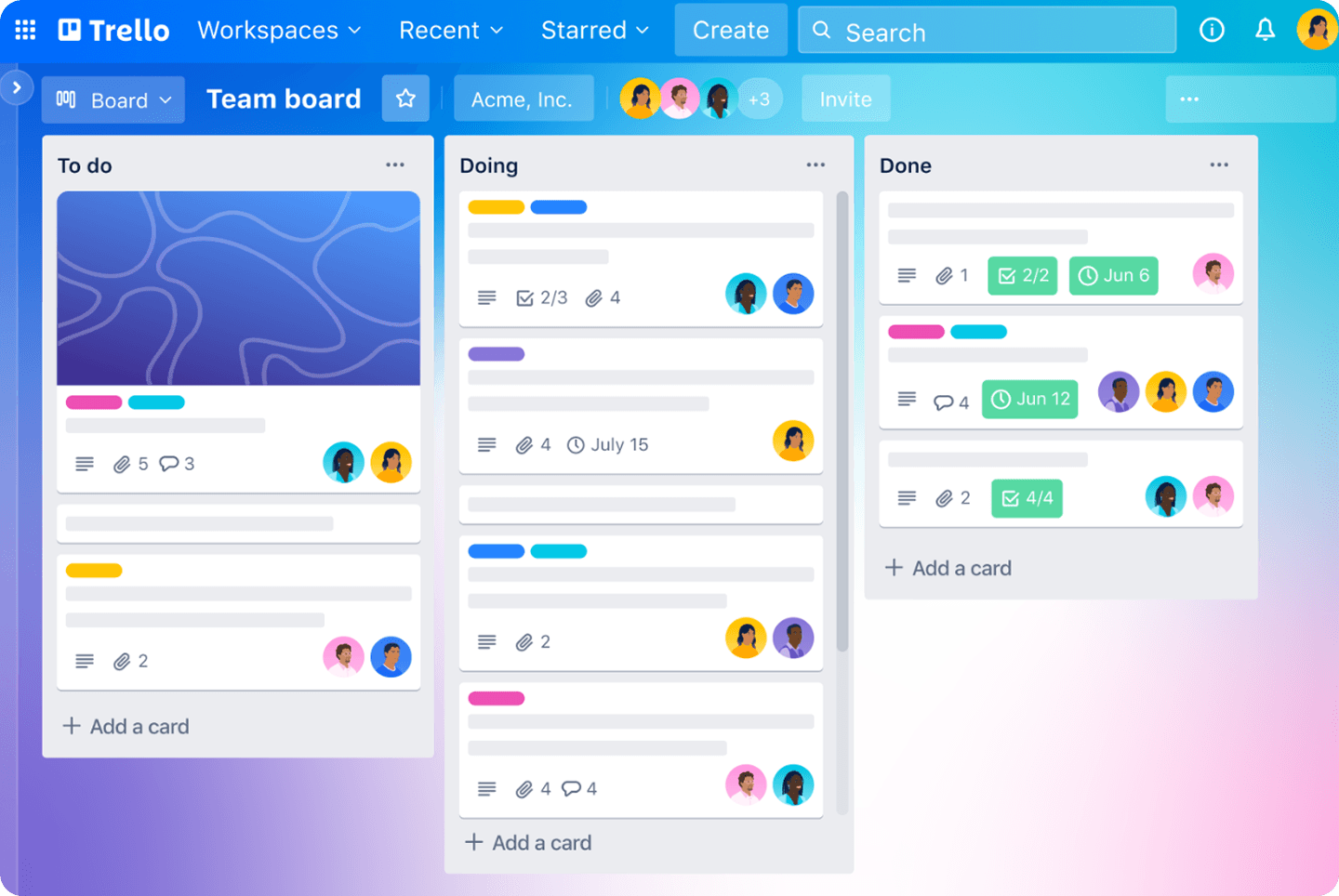
This image and its content are sourced from Monday. All rights reserved to their respective copyright holders.
Task Management
Trello allows users to manage tasks by creating cards for each task, which can include detailed descriptions, comments, attachments, and due dates. Each card can also be assigned to team members, ensuring clear responsibilities. The platform’s use of checklists within cards makes it easy to break tasks into smaller, actionable steps. However, while Trello handles basic task management well, it falls short when it comes to more advanced features such as recurring tasks or linking one task’s progress to another. For teams managing interdependent tasks or needing detailed analytics, this can be a limitation. Despite this, Trello remains effective for straightforward task tracking and team collaboration.
Column Types
Trello uses "columns" or "fields" within cards to organize and manage task details. These inputs allow users to add various types of information to their tasks, providing a structured way to track progress, Trello provide 10 types of inputs. Here’s a breakdown of the main column types in Trello with their strengths and limitations:
Title Field
The title field serves as the primary identifier for each card. It provides a concise name for tasks or projects. While straightforward and essential, it can sometimes feel limiting as there are no options for sub-headings or detailed categorization directly in the title or even put the title translation in case of changing the language.Description Field
This field allows users to add detailed information about a task, such as instructions or project details. While it provides ample space for explanations, it lacks rich formatting options like tables or embedded images, which could enhance clarity for more complex tasks.Due Date
Users can assign deadlines to tasks using the due date column. This feature is crucial for time-sensitive projects. However, Trello does not provide built-in alerts for overdue tasks unless integrated with external tools, which can lead to missed deadlines in larger teams.Checklist
The checklist feature enables users to break down tasks into smaller, actionable items. It's excellent for tracking progress within a task. However, there’s no native way to link checklist items to other cards or tasks, making it harder to manage dependencies or related work.Labels
Trello offers a labeling system for categorizing tasks by color and keyword. While it helps in visually identifying task types or priorities, the limited customization options for labels may not suffice for more complex workflows requiring advanced tagging systems.Attachments
Cards can include file attachments, allowing users to add documents, images, or links. While convenient, there’s a file size limit (10MB on free plans and 250MB on paid plans), which can be restrictive for teams working with larger files.Custom Fields (Available on Paid Plans)
Custom fields let users add specific types of information, such as dropdowns, numbers, or text inputs, tailored to their needs. While flexible, this feature is only available in premium plans, limiting access for users on the free plan.Comments
Comments enable team members to discuss a task directly within the card. While this promotes collaboration, discussions can become cluttered and difficult to track in cards with many contributors.Members
Tasks can be assigned to team members to clarify responsibilities. However, there’s no built-in way to assign multiple people specific roles or subtasks within the card, which can cause confusion in larger teams.
Conclusion: Trello offers a variety of inputs to manage tasks effectively, making it suitable for small to medium-sized projects. However, its limitations in advanced functionality, such as the lack of detailed formatting, dependency management, and restrictive features in the free plan, make it less ideal for larger or more complex workflows. Users needing deeper customizations or advanced collaboration tools may require external integrations or consider alternatives.
Trello Pricing
Trello Pricing (Monthly)
Free Plan: $0/month
Includes:
Unlimited cards.
Up to 10 boards per Workspace.
Unlimited Power-Ups per board.
Unlimited storage (10 MB/file)
Standard Plan: $6/user per month
Includes all Free Plan features, plus:
Unlimited boards.
Advanced checklists.
Custom fields.
Unlimited storage (250 MB/file).
1,000 Workspace commands for automation.
Premium Plan: $12.50/user per month
Includes all Standard Plan features, plus:
Multiple views (Calendar, Timeline, Table, Dashboard, and Map).
Workspace views: Table and Calendar.
Unlimited Workspace commands for automation.
Enterprise Plan: $210/user per year (Billed Annually)
Pricing varies based on team size but is approximately $17.50/user per month.
Includes all Premium Plan features, plus:
Unlimited Workspaces.
Organization-wide permissions.
Public board management.
Advanced security features.
All prices are billed monthly for plans except the Enterprise Plan, which requires annual billing.
Trello Pricing
Kanban:
Trello: Trello's core feature is its Kanban boards, which provide a simple and visual way to organize tasks into columns such as "To Do," "In Progress," and "Done." It’s ideal for teams with straightforward workflows but can become overwhelming for large-scale projects with many tasks, as it lacks built-in filtering or sorting options.
Datalexing: While Datalexing also offers Kanban-style boards, it enhances the functionality by integrating tasks directly with other tools like tables and dashboards, allowing for better organization and context. This feature ensures smoother workflows and eliminates the clutter commonly experienced with large Trello boards.
Winner: Datalexing, for its integration and ability to handle more complex workflows effectively.
Task Management:
Trello: Offers basic task management features, such as creating cards for tasks, assigning them to team members, and adding due dates. While this works well for simpler projects, Trello lacks advanced options like task dependencies or subtasks, which are crucial for managing interdependent workflows.
Datalexing: Goes beyond the basics by supporting task dependencies, subtasks, and real-time tracking. Users can also link tasks to multiple projects, making it an excellent choice for teams managing interconnected responsibilities. Collaboration is further enhanced with built-in discussion spaces for each task or subtask.
Winner: Datalexing, for its advanced task management features that cater to complex project requirements.
Columns Types:
Trello: Trello offers a range of basic inputs within cards, such as title, description, due dates, checklists, labels, attachments, and comments. These inputs are simple and work well for small projects. However, it lacks advanced options like linked fields or structured inputs. Features like custom fields are only available in paid plans, which increases the cost for users who need more customization.
Datalexing: Datalexing excels in providing a wide variety of column and input types, with more than 25 input options that allow users to comprehensively manage tasks and data. In addition to basic inputs like text and attachments, Datalexing offers advanced columns such as linked data tables, dropdown menus, conditional logic, and formula fields. These inputs enable teams to create dynamic and interconnected systems effortlessly.
Winner: Datalexing, ffor its flexibility and variety of inputs that cater to both simple and complex workflows.
Trello Vs. Datalexing: Who Wins? Who Loses? You Decide
When comparing Trello and Datalexing, the best choice depends on your team’s needs and the complexity of your workflows. Both platforms offer unique features, but each targets a different type of user:
Trello is ideal for individuals or teams managing simple tasks and small, straightforward projects using its Kanban system. However, it lacks advanced features such as task dependencies, tracking task deadlines, and built-in communication within tasks, which limits its usability for more complex projects.
Datalexing, on the other hand, shines with its advanced task management tools, task linking, and the ability to track time spent on each task. It is designed for teams that require consistent workflows and precise tracking.
Which one should you choose?
Choose Trello if you’re looking for simplicity in small projects.
Choose Datalexing if you need advanced task management, detailed analysis, and team management with enhanced collaboration.
Trello Vs. Datalexing: The Better Productivity Tool
Trello:
Best for: Simple task management and small teams.
Pros: Easy to use, visually appealing interface.
Limitations: Limited features, no task linking, and lacks advanced capabilities for complex projects.
Datalexing:
Best for: Teams in the Middle East needing advanced task management, task tracking, team management, and enhanced collaboration.
Pros: Comprehensive task management with dependencies, regional compliance, and flexible collaboration tools.
Conclusion:
Trello excels in simplicity and ease of use but is less suitable for complex needs.
Datalexing is the best choice for businesses needing advanced tools and enhanced collaboration features.
Share